“I want to use Splunk to analyze fake / simulated attack data, but I don’t know how to create the data. I want a cyberattack version of Splunk’s practice data.”
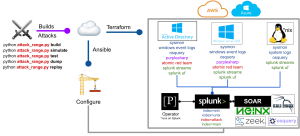
It took a bit of Google Magic, but I found out about Splunk Attack Range! It’s a Github project put together by Splunk specifically for that process! It’s hyperlinked above, but also here:
https://github.com/splunk/attack_range

Sounds so good! Perfect, right?!
You set up an environment and, in the process, provision resources in Azure / AWS to become a part of the infrastructure. From there, you can generate attack data pertaining to those machines, and you can set up Splunk forwarders on those machines to forward data to whichever machine you’ve got set up to be the search head / “command center”.
Should be cool! Let’s get into it:
——
I tried deploying Splunk’s Attack Range on AWS and Azure. If you are a newbie like me, and especially with what equipment I’ve been working with, it’s not a walk in the park.
Here’s what happened:
First things first, hardware. I’m on a practice Windows laptop, and I learned that you can’t do it on Windows unless you have either Windows Subsystem for Linux and/or Docker (to run it out of container).
What’s Windows Subsystem for Linux? Didn’t know that either. No experience with Docker or containers. Only know the theory. OK, let’s try!
OK, well – cool – I installed both, and I thought “If the container doesn’t work, I can just try it purely on WSL.”

Four whole days on it, learning navigation and infrastructure, and it still didn’t work out.
Now, the first, and turns out, massive, hurdle was Python. I’m fine with Python for the most part, but with this new laptop, I downloaded the newest version, and I got error after error. Missing this and missing that. Incompatibility after incompatibility. Sometimes that happens – newer releases aren’t compatible with older libraries. I get it. I try some workarounds…many of them! I even tried the ‘sudo’ version of running python, which is never recommended. I took precautions, so nothing’s permanently screwed up haha

What ultimately worked out…for a while, was downloading a library that contained and would run Python 3.8 through a virtual environment (I think it had something to do with deadsnakes, the library), and that was good for a while, but ultimately it always came down to Terraform.
Terraform, for those of you who don’t know, is an infrastructure as code tool — it’s for provisioning and managing cloud infrastructure.
In theory, it’s quite cool!
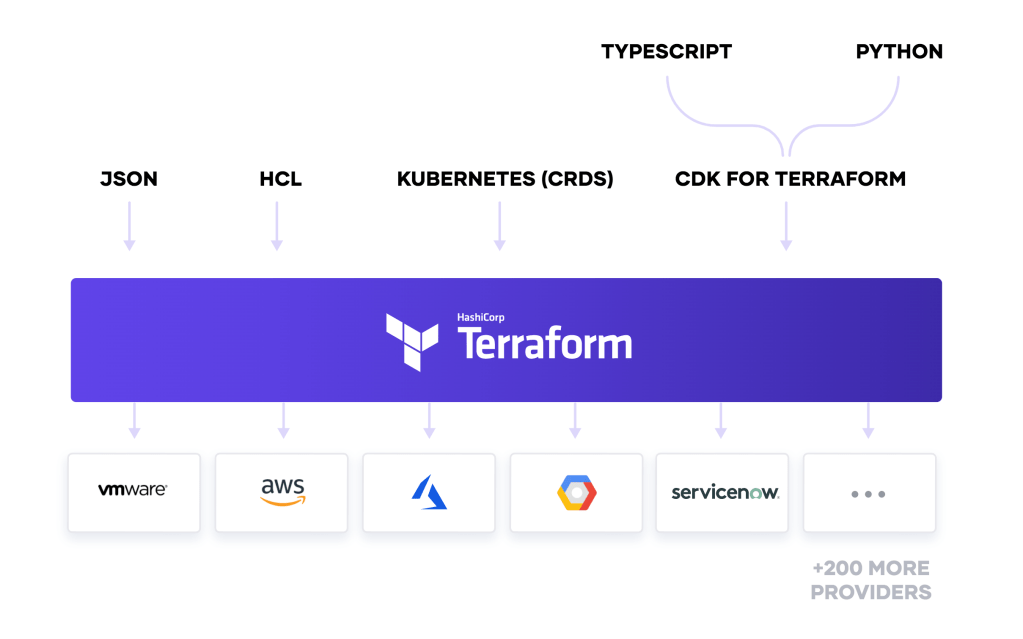
After all the setup and configuration was done, I would run the python build program to actually build all the infrastructure in AWS for Attack Range, Terraform would get stuck.
Config problem? Dunno – I looked through so many different configuration files, all the directories and subdirectories, plugged in different variables in the variable text file for the simulation data…vim and nano to do all the editing when needed..all kinds of eye-spinning stuff in minute details that I had never seen.
I lookup up a lot of questions online, talked to ChatGPT Plus, and did some general troubleshooting, but it persisted.
Really weird and unexpected stuff, and this is even with the container! Containers are supposed to make this very easy, but it never really worked out, I suppose. I do think it ultimately came down to incompatibility issues with Terraform and the various versions of all the packages.
Onto doing everything via WSL, no containers involved. Almost pure Linux! Hadn’t ever worked with Linux before, not really.
It goes fine! Until it’s time for the python build command. Then….same issues as trying to run from the container. Still a freezing up from Terraform.
Same!
But I think: “This is a (mostly) full-Linux environment; this should be fine if I just go through all the troubleshooting.”
(one full day, dozens of solutions and workaround and jerry-rigging attempts later, it all comes out to the same thing – same problems)
It was a valiant attempt! But ultimately, I never could get back the terraform stage.
All of this is being done for AWS, by the way — it’s getting partially though provisioning the resources, but never fully executes the build, so I have to essentially reset and re-provision with every attempt.
Now — and I don’t know why — but I tried ALL of those solutions yet again on Azure in another attempt.

Things go a little bit more smoothly! It’s easy! For a while! WSL is proving easier and easier to work though. It’s easier to navigate and work through the problems.
Vim, Nano, and ChatGPT Plus
Viewing and editing all types of text files have become my new hobby. Cat, Vim, Nano, you name it. I was in and out of those text editors like a cat (animal cat, not computer cat) chasing a laser pointer. And another lifeline, ChatGPT Plus. Yeah yeah yeah – I know it’s not perfect, but it’s constantly improving, and it does offer some ideas from different angles that I hadn’t thought. When using it to generate ideas, I think that’s when it’s best. I must’ve asked hundreds of questions, trying to troubleshoot this laborious and labyrinthine process.
But then we hit it – the wall.
We ran into issues with the Azure CLI on WSL and authentication. It simply refused to acknowledge my authentication and logins, despite me going through every single configuration file and manually inputting and verifying tenantID / subscription ID, the az login command, etc.
I painstakingly went though every single file pertaining to authentication and authorization … ALL of them. I went through all the troubleshooting, but after about a day, it ultimately seemed to be futile. It never did work.

Another day.
The Legacy MacBook
Desperate times call for desperate measures, so I got my legacy MacBook Pro from 2014 out, thinking it might just be my unlikely savior. But alas, it was too old to run the programs I needed.
With that in mind, I tried intentionally downloading older versions of the programs I needed. Good idea, right? Well…for a while. I know it’s not best practice, but I was willing to accept it.
A few hours later, still no dice. Compatibility issues and bugs reared their ugly heads again, but this time with jsmin and…something else. Forgot. I got frustrated and let it go.

We’re coming down to the end of it.
I have decided to go full Linux, and as I type this, my configurations for my Ubuntu Server in VirtualBox are being implemented as I start this bad boy for the first time. Mark this as another first!
Ubuntu Server is new to me, though I certainly am no longer new to WSL and Linux and Powershell haha
I do recognize that a full-blown Ubuntu Server environment is quite different, but I guess it’s all part of the adventure, right?
The Aftermath:
After all this, you’d think I’d be a Linux and PowerShell guru, right? Well, not exactly, but I’m definitely pretty comfortable navigating these environments.
I’m not afraid following rabbit holes in directory after directory after directory. I am not intimidated by the idea of using the command line only. That’s a nice change.
- Comfortable in Linux and WSL √
- No longer dependent on a GUI √
Another lesson learned: documentation. You’ve GOT to document what you’ve done. I assumed it would work the first time, so I didn’t write down all the steps and configurations and keys and all of that stuff. However, when it failed, I had nothing written down. Now, I have the steps documented pretty thoroughly, at for myself, and at least up until a “safe point”
- Importance of documenting steps √

But here’s the main thing: it didn’t work out.
After all that effort, I had to acknowledge defeat with the all the other solutions. There comes a point at which I just had to burn it all down and start again from scratch and be OK with it.
I guess it’s because honestly, you’re not actually starting from scratch. You’ve got your prior knowledge. It may not SOLVE the problem, but you can at least not waste time with other strategies and anticipate how/when/why something might go wrong next.
- Experience √
I don’t have a product to show for it, it’s true. I failed a bunch of times, sure. It’s frustrating, yeah. Am I happy? No.
But you know what? That’s okay. It’s okay to be mad about it, but we’ll start again tomorrow.
It’s not a loss – just a lesson. I suppose that’s the big takeaway here. If each failure was a stepping stone to success, I’ve built quite the staircase.
I’m going to jump back into my Active Directory Lab Course.
Till next time!
 Home
Home 
Leave a comment